Monday, May 9, 2011

Tagging friends name in Facebook

Dear Readers,

Facebook has updated it's site with tagging friends from our list in simplest way.


By giving your friends name starting with Captial letter you can tag your post with your corresponding friends. How easy it's :)... Try it out...

Another Advantage is i can shorten my friends name as i wish. See the above screen it says "Sudhakar Pasupuleti" but i have edited him as sudhakar. In the post it will be shown as "Sudhakar" (See below). When you click on "Sudhakar" it will take to his profile.


Sunday, May 8, 2011

Camera Roll unable to select in iPhone


How often do you see your iPhone Albums like this?


I use to see at-least 3 days in a week like this. This happens because of only one reason ie., you open your albums for editing existing photo's / using the camera roll in different application for taking photo's.

A simple solution is Press your Home button twice to bring the application which is running in the background (multi-tasking) and close those app's. Now go back to albums, that's it. You are good!

Tuesday, May 3, 2011

How to block a Facebook user in Chat alone

Dear Readers,

Today let's see on how to block a particular friend in Facebook chat alone. We may need the users feed but to stay away from chat. This post will give you the solution for this.

1. Login to Facebook and on your left side click on "Friends" then click on "Edit Friends" button on the screen.
2. Click on "Create List" button and in the next pop-up window enter the name of the list as "Blocked Users in Chat" (You can define your own name) then select the users to block. Finally click on Create List after selecting the user.
3. Now you would be seeing your friends in the below list (Blocked Users in Chat).
4. Move your mouse to the status (arrow pointer) and click on "Go Offline". Doing this would appear you as offline for blocked users.


Note: If the user whom you are trying to block is added into multiple list then it may not work as you expected.

Tuesday, March 15, 2011

Solution for any Virus

Dear Readers,

Virus, Virus Virus it's annoying. Everyday new virus not a single antivirus tool stops all virus that comes in to our PC. Why? What to do? Which is the best antivirus software to buy?

Ops! series of questions when we open our mouth by spelling the word Virus. I am very sure no one will agree that virus can be stopped by a single antivirus program. Each program operates in different way and not all virus is updated, resolved thru a single tool.

I am very happy to introduce this site to my readers, Yes, I got a chance to walk thru on this site allows us to browse thru the virus which anoys us and build our own removal tool. Great! interested? Please don't stop reading this.


SocialAV is the worlds fast running online antivirus building community. Users can either search for the removal tool for the virus that anoys them, if not then they could add the name of the virus to this community. Members in this social site gives the possible way to resolve it. SocialAV will build an antivirus tool with those removal instruction which any user can download it and remove the virus. Wow!!! Give a try. You would like it.

Please remember this blog is to inspire others to learn and share. Please feel free to query me or give some tips to our readers.

Monday, March 14, 2011

iOS 4.3 Sync Issue

Dear Readers,

I just got a chance to look into the bug in iOS4.3 and found the solution too. When you sync your device with iTunes it gives error message as "the required file cannot be found".

This was a small bug with photo library sync in iTunes with iOS 4.3. To avoid this you have only 3 steps.

Step1: Uncheck the Photo library Synchronization and connect your iPhone to sync.
Step2: The auto sync will start syncronizing your device. Let it get synchronized without your photo library.
Step3: Upon successful sync click on the photo library to sync. This will sync your photo library again. This way you no need to worry about this bug.

I wish apple to fix this ASAP.

Blocking specific friends from reading your facebook status

Dear Readers,

I am back with more words this week. It's going to be a facebook week this time, i went thru many parameters and research in facebook settings and thought of sharing some tips for you all.

facebook has many options to secure and have control over our posts not everyone would have used this option. This could be the main key for success towards facebook. As we have many family and office friends added to our facebook list we may feel like sharing our status to everyone but not to couple of family/office friends. Today let's see how to block specific friends from reading our status.

Step1: Once you login to the facebook account while updating your status you would see a padblock icon as shown below. Click on "Customize" option.

Step2: On Customize option you can select the particular list and in the below option you have to enter your friends name whom we should hide this post from and Click on "Save Settings".

Incase if you want this to have it by default then check the appropriate option shown below.


Monday, February 21, 2011

Google 2 point verification

Dear Readers,

As i said you all early in my wall that Google has just announced the next level of security measure to our accounts by introducing 2 point verification.

2 Point verification is nothing but once you enter your password for any Google account , you would be prompted to enter the verification code which will be generated on your smartphones. Once you enter the verification code if it matches then you would be allowed to access your account else you will not be able to access your account.

This two point verification is divided into two different parts 

1. Via smartphone
2. Via application specific password.

Via Smartphone:

This method is nothing but your verification code will be generated via your smartphone thru Google Authenticator application and you can use this to login to your Google account using that verification code.


Via application specific password:

Once smartphone verification is enabled for example if you have configured your gmail account with outlook or with your iphone mail application then it will not fetch any emails. It will say authentication failed. Because these applications will not be prompting for verification code so you would need to enter your application specific password.


Don't worry Google has many recovery option in-case if your phone is missed or stolen.

It's very simple to activate 2 point verification code.

1. Login to your Google account
2. Click on settings
3. Click on Accounts and import tab
4. Click on "Other Google account Settings"
5. Now click on "using 2 step verification" rest is very simple. Follow as said on screen.

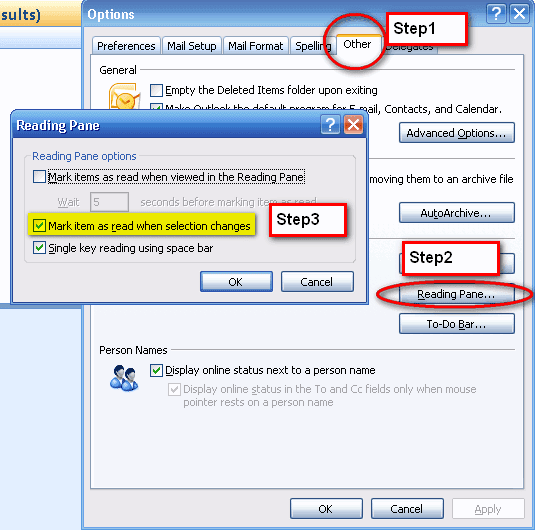
Outlook items read when selection changes

Dear Readers,

I have seen many of my co-workers suffering with this problem. They open outlook and start reading emails. When they move to next, next emails the previous emails goes read. In this way they miss out some important emails or they again mark that as unread to read it later.

This happens daily but no one is fixing this though they understood it's an extra effort for them daily. It's very simple to fix. Please follow the below steps.

Step1: Goto Tools --> Options
Step2: Click on "Other" tab and select "Reading Pane" under Outlook Panes.
Step3: Now un-check "Mark items as read when selection changes".


Saturday, February 5, 2011

Microsoft Office 2003 to 2007 usage

Dear Readers,

One of our reader has queried to us like they were using office 2003 for long and now they have upgraded to 2007 version. The interaction and the usage is very different in 2007 compared with 2003.

This becomes difficult to everyone hence microsoft has given an online interactive guide thru which we can click on the options as like 2003 version and it will show how we should work in 2007 version.

Try this and let me know if you specifically looks for something.

Click here to navigate to interactive guide.

Extracting cells with specific Character

Dear Readers,

I got a scenario last week like in our shop we have 1000+ jobs which runs everyday. We have got the entire list of jobs that runs in our server and the requirement is to differentiate Daily/Weekly/Monthly jobs in different colums. The only identity is the 4th character of the job name gives either it's weekly / monthly / daily.

4th character = D is daily W is weekly M is monthly.

So if it's daily i need to put  Y it in column "Daily" , Weekly in Column "Weekly" , Monthly in Column "Monthly" (See below)

Job Name Daily Weekly Monthly

ABCD120N Y N N

BCED125N Y N N

ERED124N Y N N

WERW130N N Y N

TERM140N N N Y

The formula that i used is  =IF(MID(A2,4,1)="d","Y","N"). It's nothing but i am taking the 4th character of the job name and if it's "D" then i place Y in that column else N. Same in monthly just replace "D" with "W" and for monthly "D" with "M".

Today's iPhone/iPod touch Deal

Dear Readers,

Mad Chad is a game which has scored good ratings in it's shortest release period. It;s a crazy game that many loves to play. Please try it out.

Tuesday, February 1, 2011

Cloud Printing thru Gmail

Dear Readers,

I am extreamly sorry that i am late to inform on this, but the delay was to make sure if it works good for me, so that i can explain you better.

Yes, a week before Google has kicked out it's next feature to us with Cloud printing. When apple folks raise their voice stating iPhone 4 has a great feature to do wifi printing thru air print which is compatible only with iPhone4 or above. Google was quite for some time until clound print was announced and now the voice of google on this cloud printing is unreachable / unbeatable by apple.

Cloud printing is nothing but you configure your home printer thru your google account and you will be able to print from any part of the world to your printer. All you need to do is activate your google account with this clound print that's it. You are done, you can now print from your gmail account thru any computer or mobile app to your configured printer.

Simple Requirement:
1. Should have printer configured to your computer.
2. Install Google Chrome Browser Ver 9.0 or higher. Click here to download and install.

Steps to activate your clound printing.
1. Once chrome new version is installed, open "Options"  from tools menu.
2. Click on "Under the Hood" tab, scroll down till end you would be seeing "Google Cloud Print" option.


3. Click on "Sign in to Google Cloud Print" and enter your google credential.  Your account will be enabled in no time. That's it. You can click on "Print Test Page" if required to make sure everyting is fine.

4. From now you can print documents from your google account to your printer irrespective to your location. Wow!!! We love you Google!!!!


Unread message in gmail

Dear Readers,

There are couple of changes in gmail Labs recently that i have noticed.

1. Search option for gmail labs has been introduced. Ie., you can give a search of any lab features instead of scrolling down.

2. New lab feature "Unread Message Icon". Actually either you can turn on "Title Tweak" lab feature or Unread Message icon feature. Both does the same job but display is different.


Stop Ads in your Gmail

Dear Readers,

An another good day with resolution to couple of queries from our readers. 

Ads are good occationally not every day, every minute. This really anoys to everyone. Most of you should be aware of Google Ads. They try to put ads on all possible applicaitons that google have and earn $$$'s by themself.

They put the ads on our gmail mailbox. Our readers has sated that they click on the ads accidently many times and it pops up many windows. Though not all ads will popup multiple windows but if we don't want obvisouly we should stop it. Lets see how.

1. Login to your Gmail account
2. At the top right corner click on "Settings"
3. Click on "Web Clibs" tab on the listing
4. Uncheck "Show my web clips above the Inbox" option. This will stop your ads in your gmail inbox.


Dear All, This blog is to inspire others to share and learn hence please share your learnings with us.

Today's iPhone / iPad touch delas

It's been long time that we posted free app deal... It's time now though there are many apps comes with different deals we look for some good app for our readers.

If you are interested in a puzzle kinda game then go for "KUVIO" . it's a pattern matching game. It's free for couple of days only. BlogBooster-The most productive way for mobile blogging. BlogBooster is a multi-service blog editor for iPhone, Android, WebOs and your desktop

Saturday, January 29, 2011

Online Photo Editing Free

Dear Readers,

I feel you would be very happy to play in this website that i am gonna introduce to you all today. As i am very much interested in photo/music/video editing i love this website very much.

http://www.befunky.com is the name of the website and it allows us to do online photo editing and adding effects to our photo's. All you need to do is just upload your photo and add some basic effects then download your colorful photo to your PC.

Features:

  • Free to use with many features
  • Add graphics, text, frames etc.,
  • No Registration required
  • Many photo effects with no ad disturbances.

Abbu's Rating: 3.5 / 5


ISO Burner

Dear Readers,

Last week one of my friend Mr.Iqbal has requested to share some freeware thru which he can burn ISO files in USB drive. This is bit tricky requirement.

Yes, we might have seen some of the burning tools which will allow us to burn the ISO files in CD/DVD but not with USB drive.

After a good search i found a tool named Passcape ISO Burner.

This tool is a freeware and simple to use it. It creates a bootable disc with the ISO image on CD/DVD/USB drive. 


Features:
  • Burn ISO image to CD/DVD/ USB drive
  • Create Bootable CD/DVD/USB disk
  • Unpack ISO image to your Desktop
  • No Additional softwares required
  • Easy to use and no installation required.
  • User Friendly

Dear All, Please share your learnings in this blog. This blog is to inspire others to learn and share their knowledge.

YouTube video Download, Upload and Comments

Dear Readers,

One of our blog reader Mr.Thomas has queried about a tool which is good to download , upload any YouTube videos to our desktop and stay signed in to comment on other videos as well. Thanks for your query Mr.Thomas.

I found a tool named "DeskTube" which fits for your requirement. This tool should be installed in your PC and it will allow you to download, upload and comment on any YouTube video. It's a freeware and you can use it for this requirement.

You can also give a search on any YouTube video. One quick observation on this tool is the download of video is of only one format which is .MOV. May be you can use converters if you are looking for some specific format. 

Dear all, this blog is entirely to inspire others to learn and share your knowledge. So please share your learnings.

Tuesday, January 18, 2011

Readers Queries

Dear Readers,

We have received around 40+ emails in this month with various queries on computers. Thanks for all the users who has sent an email with queries.

For your better convenient i have added a new form in the left side of the window thru which you can directly post us with your queries.

We shall try to resolve your queries it as much as we can. Please bear with us on any delays. Once again thanks to everyone's support. This entire blog is to learn and share what we have in our memory. In case if you would like to share any of your learnings you are always welcome. We shall publish with your names.

In addition, some of our reader have requested to write reviews on some movies that i have watched recently :).... Thanks for accepting my earlier reviews. Actually i don't have time now a days to watch more movies. I shall try to write reviews in case if i see some movies. :) Thanks for asking.


Notification of video uploads in YouTube

Dear Readers,

One of our friend have queried to us on the issue about not receiving notification on new video uploads on subscribed YouTube user.

In general, once you subscribe to a particular user you should be able to view their new changes and uploads to their videos in YouTube. In case if you have subscribed but didn't get any notification if they upload any new video's then it sounds like you didn't check the notification option when you subscribe.

Let's see how :


1. If you know your friends user name then type the URL as shown here in your browser address bar. 
Eg: http://www.youtube.com/user/abbu4fun. Here abbu4fun is the YouTube user name.

2. Click on the "Subscribe"  button which will be near to user's name as shown below and make sure you check the box "Also email me for each new upload" and click on "Update" button.


That's it. You will get the notification of each new uploads of the user that you have subscribed.