Sunday, April 25, 2010

Image optimizing tool

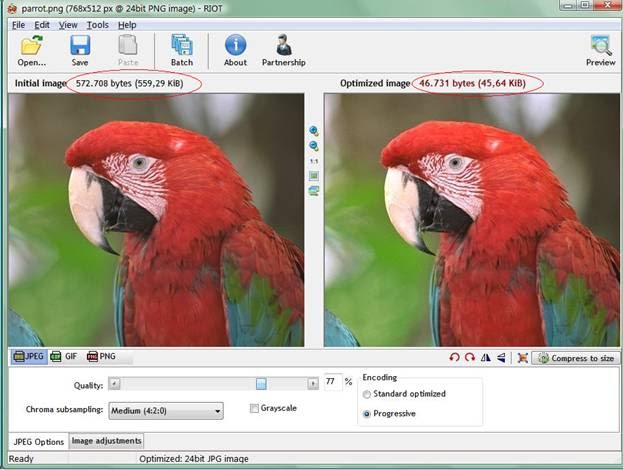
Many of us would be sending picture files to your friends,family, relatives etc., but the major problem is size. Yes, there are many softwares available in www to reduce the size of the image but we the resolution changes. It looks bad sometimes.
Radical Image Optimization Tool (RIOT for short) is a free image optimizer that will let you to visually adjust compression parameters while keeping minimum filesize.

Click here to download


Demolition call - Funny gal

Listen to this !!! Very funny.. a gal calls to a demolition company and ask to destroy her school....

YouTube - Demolition call (Legendada em Portugues)

Sunday, April 18, 2010

Drag and Drop attachments in your Gmail

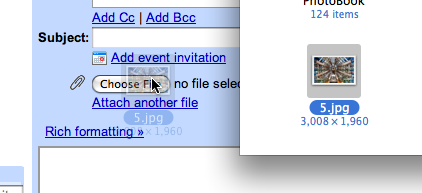
Google Google Google!!! Yes it’s Gmail that gives this feature as like outlook. While composing just we can drag and drop the documents to our compose box instead of browsing and locating the path. Google saves your time!!!

Note: Currently this feature is supported in chrome and Firefox, expected in other browsers soon.

Excel tip: Date, time insertion


Many people often use excel for various purpose. In any professional life in average 98% people use excel on daily basis.
Inserting current date and time is most often used functions. Let’s see the shortcuts to insert date and time in 3 different scenarios.
1.     Inserting Date: (Ctrl + ;)
To add the current date to a cell, begin by clicking on the cell where you want to date to be in your worksheet. Hold down the Ctrl key and hit the ; (semicolon) key. That will place the current date into any active cell.
Eg: 4/15/2010
2.     Inserting Time: (Ctrl + Shift + ;)
To insert the current time, click on the cell where you want to store the current time. Hold down both the Ctrl and Shift keys and press the ; (semicolon) key. That will place the current time into the cell.
Eg: 11:22 AM
3.     Inserting Date and Time:
To insert both the current date and the current time into the same cell, click on the cell where you want the date and time to be in your worksheet. Hold down the Ctrl key and press the ; key. Now, hit the space bar and hold down the Ctrl and Shift keys and press the ; key.
Eg: 4/15/2010  11:23:00 AM

Also,
·        To insert a dynamic date stamp into Excel, enter the following formula into any cell: =TODAY()
·         To insert a dynamic date and time stamp into Excel, enter the following formula into any cell: =NOW()

Depending on your need you can use any of the above options. 

Monday, April 12, 2010

10 Ways to protect your information in public PC

1.     PC Setup: Don’t install any software’s in public PC’s, normally it should not allow you. Installing software’s by entering your personal information and the key which you bought makes you to lose your authentication.
2.     Keyloggers: Either physical or any key logger software would do a better job. Data’s are stolen in the way that we enter details thru our keyboard only. So encryption of key would help in preventing your data’s.
3.     Avoid Certain Tasks: Unless until it’s emergency don’t login for Banking/shopping activities.
4.     Clear Cache: Always clear cache when you are about to exit from any browser.
5.     Delete Files: If you download any documents for editing or copying, make sure you Shift+Delete the file before you exit.
6.     Empty Trash/Recycle Bin: This is self explanatory.
7.     Use Flash Drives Carefully: If you save your files to a flash drive, be careful because you may end up giving all of your files on the drive to a would-be thief. The thief may have loaded software on the public computer to grab any files on a drive that is inserted into the computer. Clever thief may also have software installed to transmit virus to your flash drive.
8.     Uncheck Save Info Options: Avoid “Stay Signed in” Options for any email account login.
9.     Watch for Prying Eyes: Don’t think that you are not followed thru camera. Thief’s can have hidden camera’s hence use your body as a shield if you must type in personal information at a public PC.
10.                        Trust you’re Instincts: If you feel like public PC’s request for your personal information, stop giving it. Your profile may be stored for any spam purpose. If at any time you feel uncomfortable sharing information, don’t hesitate to leave so you don’t risk giving away your private information.